简介
LangMem 是 LangChain 官方维护的独立 Python 开源库(pip install langmem),官方文档的定位是:
“LangMem helps agents learn and adapt from their interactions over time. It provides tooling to extract important information from conversations, optimize agent behavior through prompt refinement, and maintain long-term memory.”
它要解决的问题:LLM 本身没有记忆,每次对话都是一张白纸。想让 agent 记住”用户偏好深色模式”、”上次那个方案被否决了”这类信息,并在后续对话(甚至是完全不同的会话)里用上,就得自己造一套记忆的提取、存储、检索、更新机制——LangMem 把这套机制做成了标准件。它里面每种记忆操作都遵循同一个模式:接收对话内容和当前记忆状态,让 LLM 决定如何扩充或整合记忆,再返回更新后的记忆状态。
典型用法
最常见的用法是给 agent 装上两个记忆工具,让它在对话中自己决定何时记、何时查(即 Hot Path,后文细讲):
from langchain.agents import create_agent
from langgraph.checkpoint.memory import MemorySaver
from langgraph.store.memory import InMemoryStore
from langmem import create_manage_memory_tool, create_search_memory_tool

store = InMemoryStore(
    index={"dims": 384, "embed": embeddings}  # 不配 index 就没有语义检索
)

agent = create_agent(
    llm,
    tools=[
        create_manage_memory_tool(namespace=("memories", "{user_id}")),
        create_search_memory_tool(namespace=("memories", "{user_id}")),
    ],
    store=store,
    checkpointer=MemorySaver(),
)

# thread_id 区分对话(短期记忆),user_id 填充 namespace 占位符(长期记忆按用户隔离)
config_a = {"configurable": {"thread_id": "thread-a", "user_id": "user-1"}}
agent.invoke(
    {"messages": [{"role": "user", "content": "I prefer dark mode. Remember that."}]},
    config=config_a,
)

# 换一个全新的 thread 再问,agent 依然记得上面存下的偏好
config_b = {"configurable": {"thread_id": "thread-b", "user_id": "user-1"}}
r = agent.invoke(
    {"messages": [{"role": "user", "content": "What are my display preferences?"}]},
    config=config_b,
)
print(r["messages"][-1].content)
create_manage_memory_tool 和 create_search_memory_tool 返回的都是单个普通 LangChain Tool,前者内部用 action 参数区分 create/update/delete,后者只管语义检索,两者共享 store 和 namespace 但互不耦合。
还有一点:create_agent 的 store 参数不是记忆专用。它是 LangGraph 通用的跨线程存储接口(BaseStore),官方说明是 “persisting data across multiple threads”——任何要跨对话共享的数据(用户档案、配置、缓存)都能放,LangMem 的记忆工具只是恰好把记忆存在里面。记忆工具自身也接受显式的 store 参数;不显式传时,才会在运行时从图的上下文里取 create_agent(store=...) 传入的实例。另外部署在 LangGraph Platform 上时,平台会自动提供一个 Postgres-backed store,代码里不传也有。
Background & HotPath
记忆有两种形成时机,官方文档用一张图概括:
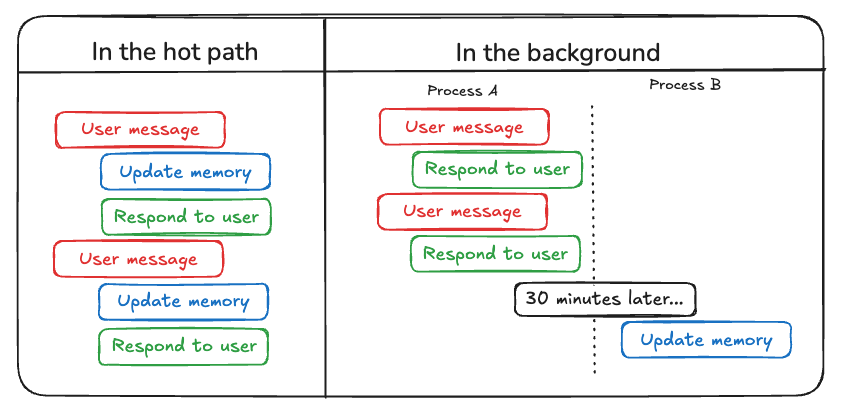
Hot Path 是主动、同步的记忆处理:把 manage_memory/search_memory 两个工具塞进 agent 的工具箱,模型在对话过程中自己判断”这个值得记”并调用工具。优点是立即生效、实现简单;缺点是增加了感知延迟,而且多了一类工具决策,可能干扰 agent 完成用户本来的需求。上一节的例子就是 Hot Path。
Background 是后台异步的记忆:对话照常进行,事后再让一个 memory manager 回顾对话、提取记忆。不增加延迟、不干扰 agent 决策,提取也更充分。典型写法(完整代码见 features/02_background_reflection.py):
| 形成方式 | 延迟影响 | 生效速度 | 处理开销 | 适用场景 |
|---|---|---|---|---|
| Hot Path(热路径) | 增加对话延迟 | 立即 | 对话过程中 | 关键上下文需要立刻记住 |
| Background(后台) | 无 | 延迟 | 对话间隙/之后 | 模式分析、总结、深度提取 |
memory_manager = create_memory_store_manager(llm, namespace=("memories", "{user_id}"))
executor = ReflectionExecutor(memory_manager, store=store)

@entrypoint(store=store)
def chat(message: str):
    response = llm.invoke(message)
    history.extend([{"role": "user", "content": message},
                    {"role": "assistant", "content": response.content}])
    # 延迟 10 秒再提取;这期间同 thread 的新 submit 会取消旧任务
    executor.submit({"messages": list(history)}, after_seconds=10)
    return response.content
ReflectionExecutor 解决一个现实问题:用户连续发消息时,每条都提取一遍既浪费 token 又只能拿到半截上下文。submit(..., after_seconds=N) 会把提取任务推迟 N 秒,这期间同一线程再有新提交,旧任务直接取消、以最新对话重新排队——即防抖(debounce)。实测用户连发 3 条消息,最终只提取 1~2 次。ReflectionExecutor 并不知道对话是否结束,只是到了推迟的时间就开始记忆提取。
三种记忆类型
LangMem 的记忆分类借鉴了人类记忆结构,每种类型服务不同目的:
| 记忆类型 | 存什么 | 例子 | 典型存储形态 |
|---|---|---|---|
| Semantic 语义记忆 | 事实与知识 | 用户偏好、知识三元组 | Profile 或 Collection |
| Episodic 情景记忆 | 过往经验 | few-shot 示例、成功对话的复盘 | Collection |
| Procedural 程序记忆 | 系统行为 | agent 的核心性格与响应模式 | Prompt 规则或 Collection |
Semantic
语义记忆有两种组织方式。Collection 是大家直觉中的长期记忆:每条记忆是一份独立文档,新对话来了就插入/更新/删除;Profile 则是一份单一文档,代表”当前状态”(用户的名字、偏好、目标等),新信息来了就原地更新这份文档,而不是新建。选择依据:需要快速拿到当前状态、或者想把档案直接展示给用户编辑,用 Profile;需要跨大量交互累积知识、按相关性召回,用 Collection。
Episodic
情景记忆不存事实,存完整经验:当时的处境、推理过程、采取的行动、为什么奏效。LangMem 用一个四段式的 Episode schema 来提取:observation(处境与相关上下文)、thoughts(关键考量与推理过程)、action(做了什么)、result(结果如何、为什么有效)。
实测用”用户借助家谱知识理解了二叉树”这段对话提取(完整代码见 features/03_memory_manager.py),agent 复盘出的经验相当像样:它在 observation 里注意到用户”没有 CS 背景,但提供了领域类比线索(家谱)”,在 thoughts 里推理”二叉树结构上几乎就是家谱(节点=人,边=父子关系),唯一区别是最多两个孩子”,action 是”把二叉树定义为每个家长最多两个孩子的家谱,并给出 Bob/Amy/Carl 的极简 ASCII 图”,最后在 result 里总结”用他自己的领域做框架让他变成了对话的主动方”。
Procedural
程序记忆编码 “agent 应该怎么做事”。语义记忆存事实(用户偏好深色模式),情景记忆存一次完整经验(上次用家谱类比讲二叉树奏效了),程序记忆存的是可复用的行为规则:语气、格式、决策边界、特定场景下该怎么响应。
落地形态有两种,对应表格里的”Prompt 规则或 Collection”。
第一种是写进 system prompt,每次对话都生效。初始 prompt 定义核心性格,再根据对话轨迹和用户反馈持续改写:
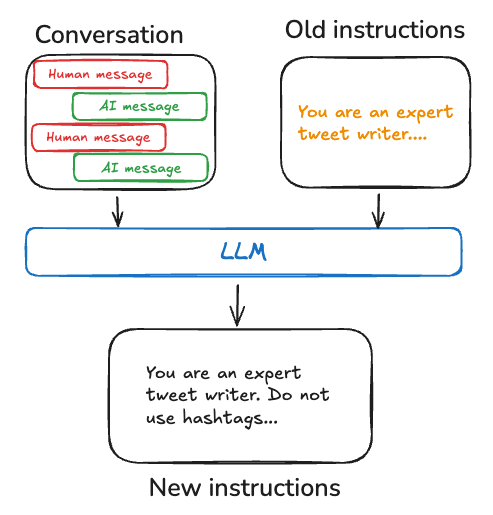
这就是 create_prompt_optimizer 干的事,单独在“优化 Prompt” 一节讲。适合必须始终遵守的规则:人设、安全边界、默认输出格式。代价是 prompt 会越改越长,所有对话都要带上整份规则。
第二种是当普通记忆条目存进 Collection,按需检索。create_memory_manager 的默认提取指令本来就把 procedural 和 semantic、episodic 并列维护——提取出来的可以是”用户要代码时先给可运行示例,理论放后面”这类规则,运行时语义检索命中再注入上下文。适合场景特定、不必每次都带上的做法(调试某类报错的步骤、对接某个内部系统的约定)。条目多了不会撑爆 prompt,但召回有漏网的可能。
选择依据:这条规则是否几乎每次都要用。几乎每次都用 → 写进 prompt;只在特定情境才用 → 存成 Collection 条目。两种可以并存:prompt 里放全局人设,Collection 里放分场景的操作手册。
记忆提取
create_memory_manager
create_memory_manager 的作用是:看一段对话(以及可选的既有记忆),决定记忆该怎么变——新建、改写或删掉过时条目——然后把更新后的记忆列表返回给你。它是纯函数,不读写任何数据库:输入 messages 加 optional existing,输出 ExtractedMemory 列表,持久化完全由调用方决定。后面的 create_memory_store_manager 就是在它外面自动接上 BaseStore 的 search / put / delete。
除模型外,签名上最要紧的是三组参数:schemas 定义记忆的 Pydantic 结构(可传多个);instructions 是提取指令(默认值见附录);enable_inserts / enable_updates / enable_deletes 三个开关分别控制允许新建、更新、删除——注意删除默认是关的(create_memory_store_manager 的 docstring 写的是默认 True,与签名不一致,以签名为准)。
用法是先定义记忆结构,再对每轮对话 invoke;上一轮的返回值作为下一轮的 existing 传回去(完整代码见 features/03_memory_manager.py):
from pydantic import BaseModel
from langmem import create_memory_manager

class Triple(BaseModel):
    """Store all new facts, preferences, and relationships as triples."""
    subject: str
    predicate: str
    object: str
    context: str | None = None

manager = create_memory_manager(
    llm,
    schemas=[Triple],
    instructions="Extract user preferences and any other useful information",
    enable_inserts=True,
    enable_deletes=True,  # 默认 False,过时事实不会被删
)

memories = manager.invoke({
    "messages": [{"role": "user", "content": "Alice manages the ML team and mentors Bob."}],
})

# 把上一轮结果原样传回,模型才能对照着更新 / 删除
memories = manager.invoke({
    "messages": [{"role": "user", "content": "Bob now leads the ML team and the NLP project."}],
    "existing": memories,
})
实测三轮对话的增删改(模型 deepseek-chat):
第 1 轮 "Alice manages the ML team and mentors Bob":
  [Triple] Alice manages ML team / Alice mentors Bob / Bob member of ML team

第 2 轮 "Bob now leads the ML team and the NLP project":
  [Triple] Bob leads ML team / Bob leads NLP project   <- 新增
  [RemoveDoc] json_doc_id='f0d1f791...'                <- 删除过时的 "Alice manages ML team"
  [Triple] Alice mentors Bob                           <- 保留

第 3 轮 "Alice left the company":
  [Triple] Alice left the company                      <- 新增
  [RemoveDoc] ...                                      <- 继续清理 Alice 的过时角色
create_memory_store_manager
create_memory_store_manager 在上面纯函数的基础上接了 BaseStore,数据流变成全自动:收到对话后先在 store 里检索相关记忆(默认最多 5 条,检索细节见下文“历史记忆”),连同既有记忆一起交给 LLM 提取/更新,最后把结果自动 upsert/delete 回 store。
它还支持 default / default_factory 参数:没有任何记忆时先初始化一份默认值(比如应用级的默认偏好),之后在这份默认值上演化——很适合 Profile 场景。
manager 不显式传 store 时,invoke 会从当前图上下文里取 create_agent 挂载的那一份。Hot Path 的记忆工具也走同一套回退,所以工具和 manager 挂在同一张图上、都不传 store 时,读写的是同一块数据;显式各传一个独立的 InMemoryStore,两边互不可见。
store 不会自动进入对话模型的上下文。这条路径只服务记忆提取,写回 store 后,正在聊天的 agent 并不会因此看见新记忆;对话要用,还得让模型调 search_memory,或者你自己 search 后拼进 system prompt。每条存的是 {"kind": ..., "content": ...} 这份正文,created_at / score 只用于检索排序,不是另一套元数据 API。
谁来触发这些读写,取决于使用方式,LangGraph 不会在对话开始时自己扫一遍 store。三种用法:
- 把 manage_memory / search_memory 塞进 create_agent 的 tools,对话模型自己决定何时 put、何时 search,开发者不用再碰 store 接口,但模型不调工具就既不记也不查;
- 把 manager 交给 ReflectionExecutor.submit,或在节点里手动 manager.invoke,这一次 invoke 内部会自动完成 search 和写回,开发者不用自己调 put/search,但必须有人发起这次 invoke——executor 只是延时代劳,不是对话结束的钩子;
- 需要每次回复前都带上记忆,就得自己在节点里 store.search 再拼进 prompt,这条路径没有任何自动注入。
历史记忆
create_memory_store_manager 处理历史记忆分三步,而且只处理检索到的那一小部分,不是整段历史:
- 检索:每次 invoke 先在 store 里取记忆,最多
query_limit(默认 5)条。LangGraph store 的search有两个独立参数,分别对应两种能力:- 结构化过滤(
filter):按value字段做条件筛选,支持$eq、$ne、$gt、$gte、$lt、$lte。它只看字段值,不看文本内容。InMemoryStore 和 PostgresStore 都支持。 - 向量检索(
query):只有配置了index才生效。查询文本经 embedding 模型转成向量,按余弦相似度排序。InMemoryStore 和 PostgresStore(基于 pgvector)都是这样。这是唯一的语义检索路径。 - 不支持关键字检索和全文检索:没有子串匹配,也没有分词、倒排索引或 BM25 这类相关性排序。
LIKE只用于 namespace 前缀匹配。 - 无索引时:
query被忽略。InMemoryStore 按候选顺序返回前 N 条;PostgresStore 按updated_at倒序返回最近更新的 N 条,score为空。 - 查询词来源:有
query_model时由小模型生成搜索词;没有时用utils.get_dialated_windows生成,而query_limit // 4在默认值下等于 1,只取最后一条消息。这个设置只有在配置了向量索引时才有语义意义。 - 注意:
MemoryStoreManager内部调用store.asearch(namespace, query=...)时不传filter。只有query_model路径下,LLM 生成的搜索参数里带了filter,它才会生效。
- 结构化过滤(
- 合并与冲突:检索结果和当前对话一起放进同一次 LLM 调用。langmem 没有独立的冲突检测模块,新旧记忆是否矛盾、该更新还是该删除,全部由模型在这次调用里决定。
phases配置的去重轮次也只作用于这批检索结果。 - 写回:新增或内容变化的条目才会 put,被标记删除的才会 delete。
这套机制的边界很明确:自动流程只维护本轮选中的记忆。即使 enable_deletes=True,也不会扫描清理未被选中的条目。如果某条过时或重复的记忆持续未被检索到,它就会一直留在 store 里。这类残留需要其他手段处理:给 store 配置 TTL(langmem 只是透传,是否生效取决于 store 实现),或者定期用脚本遍历 namespace 清理。create_memory_manager 的范围由调用方传入的 existing 决定;手动删除工具则可以按已知 ID 删除未被检索的条目。
Prompt 优化
程序记忆的落地 API 是 create_prompt_optimizer(model, kind=...):输入”对话轨迹 + 可选反馈 + 当前 prompt”,输出改写后的 prompt。三种策略(langmem/prompts/ 目录):
| 策略 | LLM 调用次数 | 实现方式 | 适用 |
|---|---|---|---|
| prompt_memory | 1 次 | 单发 metaprompt,结构化输出 {logic, update_prompt, new_prompt} |
简单场景,最便宜 |
| metaprompt | 1~5 次 | 反思循环,每步 1 次调用 | 性价比平衡 |
| gradient | 2~10 次 | 每步 2 次调用:先 think/critique 找问题,再 recommend 决策 | 最彻底,最贵 |
create_prompt_optimizer 中的 “gradient” 这个名字其实是个隐喻——它跟数值梯度没有关系,整套机制是用工具调用搭出来的反思循环。它先定义三个”假工具”:think(思考)、critique(批判)、recommend(决策,带 warrants_adjustment/hypotheses/full_recommendations 参数),用 trustcall 的 create_extractor 强制模型以工具调用形式输出。反思循环按步数强制切换 tool_choice:前 min_reflection_steps 步只允许 think/critique(强制充分反思),中间步三选一,最后一步强制 recommend(必须给结论)。如果模型判断 warrants_adjustment=False,就原样返回旧 prompt;否则把 hypotheses 和 recommendations 填进第二个提示词(DEFAULT_GRADIENT_METAPROMPT),再做一次结构化抽取得到 improved_prompt。
也就是说”梯度”对应的是:think/critique ≈ 计算梯度(找方向),recommend ≈ 走一步梯度下降(应用更新)。metaprompt 是同一个循环的简化版(每步一次调用),prompt_memory 则退化成单发调用。三个策略的默认提示词全文见附录。
实测效果(两条”用户嫌太理论、要代码”的负反馈轨迹,完整代码见 features/04_prompt_optimizer.py):原始 prompt 只有一句 “You are a helpful assistant.”,优化后两种策略都改出了”先给可运行代码、必要时才加简短解释”的风格要求。值得注意的是 metaprompt 版本还自动合成了一段 few-shot 示例(以 “User: How do I read a file in Python?” 为例展示了期望的回答风格)——这正是默认提示词里”对风格类问题优先考虑合成 few-shot 示例”的策略在起作用。另外还有一个 create_multi_prompt_optimizer,面向多 prompt 组成的复合系统(比如 researcher + writer 的多 agent 流水线):先做信用分配(把整体表现归因到各环节 prompt),再逐个优化需要调整的 prompt。
外部存储器
LangMem 的 Core API 不绑定存储,但 Stateful 层(store manager、记忆工具)都落在 LangGraph 的 BaseStore 接口上,所以换存储就是换实现:
| 实现 | 用途 |
|---|---|
| InMemoryStore | 开发调试,进程重启即丢 |
| AsyncPostgresStore | 生产自建,配合 pgvector 做向量检索 |
| LangGraph Platform | 部署平台自动提供 Postgres-backed store,零配置 |
存储模型两个核心概念:namespace(多级元组,类似文件目录,支持 {user_id} 这类模板变量运行时填充,用来按用户/团队/应用隔离)和检索(按 key 直取、按语义相似度搜索、按元数据过滤;语义搜索要求建 store 时配 index={"dims": ..., "embed": ...})。
用 Docker 起一个 pgvector Postgres,验证跨进程持久化(完整代码见 features/05_postgres_store.py):
docker run -d --name langmem-pg \
  -e POSTGRES_PASSWORD=postgres -p 5442:5432 pgvector/pgvector:pg16
from langgraph.store.postgres import AsyncPostgresStore
from langmem import create_memory_store_manager

DB_URI = "postgresql://postgres:postgres@localhost:5442/postgres?sslmode=disable"

async with AsyncPostgresStore.from_conn_string(
    DB_URI, index={"dims": 384, "embed": embeddings}
) as store:
    await store.setup()  # 首次运行建表 + 启用 vector 扩展
    manager = create_memory_store_manager(
        llm, namespace=("memories", "{user_id}"), store=store
    )
    await manager.ainvoke({"messages": [...]}, config={"configurable": {"user_id": "user-1"}})
分两个进程验证:第一个进程写入,第二个进程(全新启动)直接语义检索,能拿到那条 “prefers dark mode in all apps” 的记忆(score=0.2041)——进程重启后数据还在。
最后是两个 embeddings 相关的坑(本文示例的应对方式见 features/common.py)。一是不配 index 就没有真正的检索:InMemoryStore 不传 index 不报错,但 query 被忽略,返回的是候选集中的前 N 条,score 全为 None(PostgresStore 则按 updated_at 倒序返回,细节见“历史记忆”一节)。这意味着记忆变多后,召回的未必是与当前对话相关的条目。二是 embed 用的是独立凭证:”openai:text-embedding-3-small” 这类配置走 OPENAI_API_KEY,跟主模型的 key 无关;DeepSeek 这类对话服务根本没有 embeddings 接口(实测 404)。本文示例用了一个本地词袋哈希 embedding 演示完整链路(只表达词面重叠),生产环境必须换真实 embedding 模型。
附录
以下提示词均取自 langmem 0.0.30 源码原文。
记忆提取
create_memory_manager / create_memory_store_manager 的默认提取指令(langmem/knowledge/extraction.py#L185):
You are a long-term memory manager maintaining a core store of semantic, procedural, and episodic memory. These memories power a life-long learning agent's core predictive model.

What should the agent learn from this interaction about the user, itself, or how it should act? Reflect on the input trajectory and current memories (if any).

1. **Extract & Contextualize**
   - Identify essential facts, relationships, preferences, reasoning procedures, and context
   - Caveat uncertain or suppositional information with confidence levels (p(x)) and reasoning
   - Quote supporting information when necessary

2. **Compare & Update**
   - Attend to novel information that deviates from existing memories and expectations.
   - Consolidate and compress redundant memories to maintain information-density; strengthen based on reliability and recency; maximize SNR by avoiding idle words.
   - Remove incorrect or redundant memories while maintaining internal consistency

3. **Synthesize & Reason**
   - What can you conclude about the user, agent ("I"), or environment using deduction, induction, and abduction?
   - What patterns, relationships, and principles emerge about optimal responses?
   - What generalizations can you make?
   - Qualify conclusions with probabilistic confidence and justification

As the agent, record memory content exactly as you'd want to recall it when predicting how to act or respond.
Prioritize retention of surprising (pattern deviation) and persistent (frequently reinforced) information, ensuring nothing worth remembering is forgotten and nothing false is remembered. Prefer dense, complete memories over overlapping ones.
实际调用时还会拼上固定后缀和会话内容(extraction.py#L468 _prepare_messages):
# system
You are a memory subroutine for an AI.

# user = {instructions} + 固定后缀 + <session_{uuid}> 包裹的对话全文
Enrich, prune, and organize memories based on any new information. If an existing memory is incorrect or outdated, update it based on the new information. All operations must be done in single parallel multi-tool call. Avoid duplicate extractions.
提示词优化
prompt_memory 策略(INSTRUCTION_REFLECTION_PROMPT,单发调用,结构化输出 {logic, update_prompt, new_prompt};langmem/prompts/prompt.py#L3,多轨迹版本 INSTRUCTION_REFLECTION_MULTIPLE_PROMPT 在 L39):
You are helping an AI agent improve. You can do this by changing their system prompt.

These is their current prompt:
<current_prompt>
{current_prompt}
</current_prompt>

Here was the agent's trajectory:
<trajectory>
{trajectory}
</trajectory>

Here is the user's feedback:

<feedback>
{feedback}
</feedback>

Here are instructions for updating the agent's prompt:

<instructions>
{instructions}
</instructions>

Based on this, return an updated prompt

You should return the full prompt, so if there's anything from before that you want to include, make sure to do that. Feel free to override or change anything that seems irrelevant. You do not need to update the prompt - if you don't want to, just return `update_prompt = False` and an empty string for new prompt.
metaprompt 策略(DEFAULT_METAPROMPT,反思循环每步使用;langmem/prompts/metaprompt.py#L27):
You are helping an AI assistant learn by optimizing its prompt.

## Background

Below is the current prompt:

<current_prompt>
{prompt}
</current_prompt>

The developer provided these instructions regarding when/how to update:

<update_instructions>
{update_instructions}
</update_instructions>

## Session Data
Analyze the session(s) (and any user feedback) below:

<trajectories>
{trajectories}
</trajectories>

## Instructions

1. Reflect on the agent's performance on the given session(s) and identify any real failure modes (e.g., style mismatch, unclear or incomplete instructions, flawed reasoning, etc.).
2. Recommend the minimal changes necessary to address any real failures. If the prompt performs perfectly, simply respond with the original prompt without making any changes.
3. Retain any f-string variables in the existing prompt exactly as they are (e.g. ).

IFF changes are warranted, focus on actionable edits. Be concrete. Edits should be appropriate for the identified failure modes. For example, consider synthetic few-shot examples for style or clarifying decision boundaries, or adding or modifying explicit instructions for conditionals, rules, or logic fixes; or provide step-by-step reasoning guidelines for multi-step logic problems if the model is failing to reason appropriately.
gradient 策略由两段提示词组成。第一段 DEFAULT_GRADIENT_PROMPT 负责”找问题”(配合 think/critique/recommend 工具;langmem/prompts/gradient.py#L16):
You are reviewing the performance of an AI assistant in a given interaction.

## Instructions

The current prompt that was used for the session is provided below.

<current_prompt>
{prompt}
</current_prompt>

The developer provided the following instructions around when and how to update the prompt:

<update_instructions>
{update_instructions}
</update_instructions>

## Session data

Analyze the following trajectories (and any associated user feedback) (either conversations with a user or other work that was performed by the assistant):

<trajectories>
{trajectories}
</trajectories>

## Task

Analyze the conversation, including the user’s request and the assistant’s response, and evaluate:
1. How effectively the assistant fulfilled the user’s intent.
2. Where the assistant might have deviated from user expectations or the desired outcome.
3. Specific areas (correctness, completeness, style, tone, alignment, etc.) that need improvement.

If the prompt seems to do well, then no further action is needed. We ONLY recommend updates if there is evidence of failures.
When failures occur, we want to recommend the minimal required changes to fix the problem.

Focus on actionable changes and be concrete.

1. Summarize the key successes and failures in the assistant’s response.
2. Identify which failure mode(s) best describe the issues (examples: style mismatch, unclear or incomplete instructions, flawed logic or reasoning, hallucination, etc.).
3. Based on these failure modes, recommend the most suitable edit strategy. For example, consider::
   - Use synthetic few-shot examples for style or clarifying decision boundaries.
   - Use explicit instruction updates for conditionals, rules, or logic fixes.
   - Provide step-by-step reasoning guidelines for multi-step logic problems.
4. Provide detailed, concrete suggestions for how to update the prompt accordingly.

But remember, the final updated prompt should only be changed if there is evidence of poor performance, and our recommendations should be minimally invasive.
Do not recommend generic changes that aren't clearly linked to failure modes.

First think through the conversation and critique the current behavior.
If you believe the prompt needs to further adapt to the target context, provide precise recommendations.
Otherwise, mark `warrants_adjustment` as False and respond with 'No recommendations.'
第二段 DEFAULT_GRADIENT_METAPROMPT 负责”应用更新”(langmem/prompts/gradient.py#L67):
You are optimizing a prompt to handle its target task more effectively.

<current_prompt>
{current_prompt}
</current_prompt>

We hypothesize the current prompt underperforms for these reasons:

<hypotheses>
{hypotheses}
</hypotheses>

Based on these hypotheses, we recommend the following adjustments:

<recommendations>
{recommendations}
</recommendations>

Respond with the updated prompt. Remember to ONLY make changes that are clearly necessary. Aim to be minimally invasive:
